
Wrath is the starting point
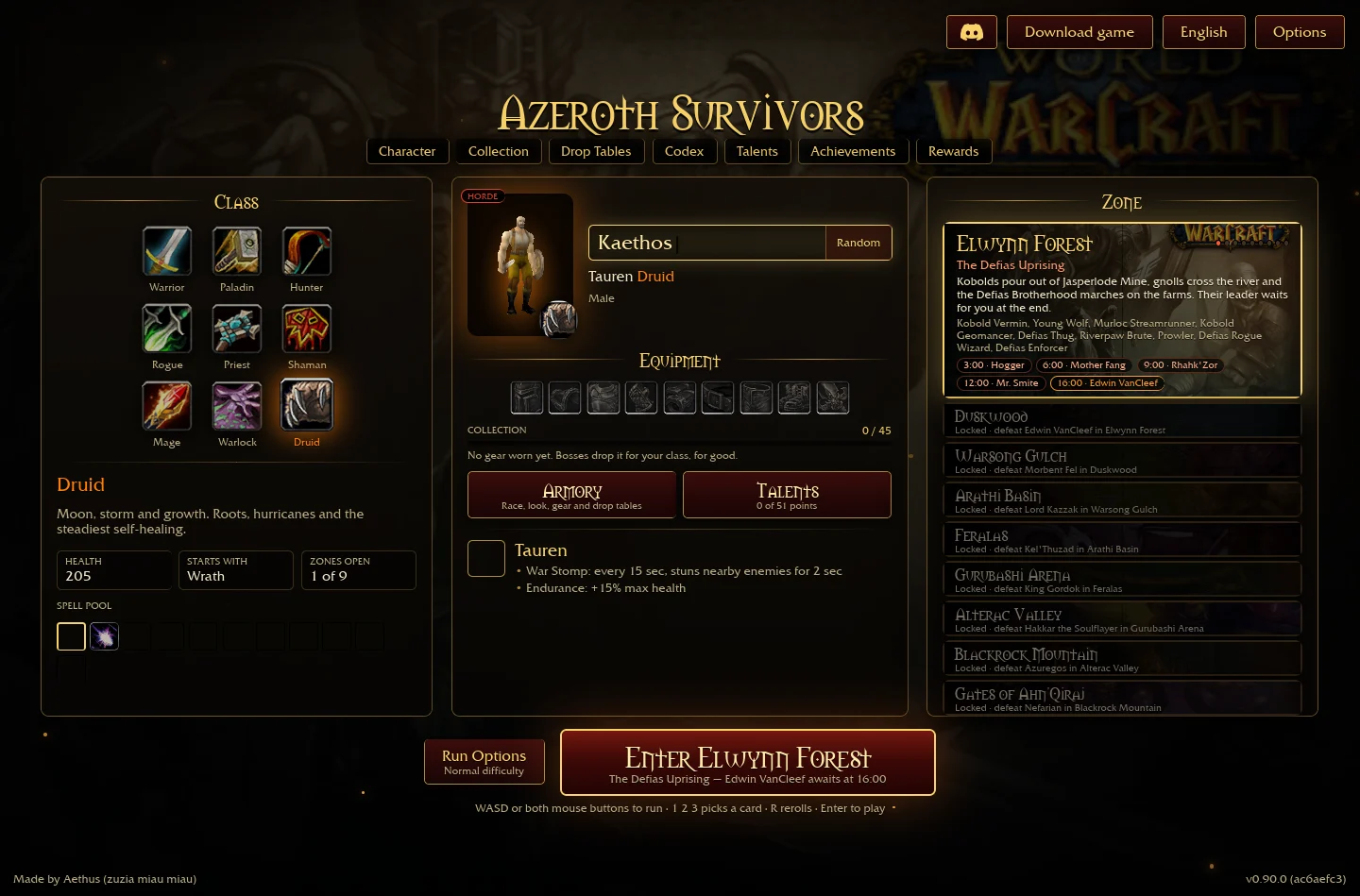
The class picker lists Wrath as the starting spell. Its description mentions roots, hurricanes and sustained self-healing. Those words describe the class's available direction; they do not mean that every named effect is active on a fresh run.
A run's offered cards still determine its selected spells and upgrades, up to the six-spell limit. If you are learning the controls or deciding what survives a run ending, start with the beginner guide. Permanent talent choices and equipment are separate decisions from that temporary spell setup.
Permanent milestones can replace this fresh start: Rake starts a run with Swipe and Force of Nature starts it with Moonfire. Check the inspected node table before assuming that a developed Druid must still open with Wrath.
Compare the three displayed talent branches
The inspected tree shows Balance, Feral Combat and Restoration. These are the names of its 10-, 20- and 30-point milestones. A milestone name alone does not establish its damage, proc chance or a full recommended allocation.
| Branch | 10 points | 20 points | 30 points |
|---|---|---|---|
| Balance | Omen of Clarity | Starfall | Force of Nature |
| Feral Combat | Rake | Blood Frenzy | Leader of the Pack |
| Restoration | Swiftmend | Tranquility | Tree of Life |
On a narrow screen, scroll the table horizontally to read every column.
Verified talent effects and prerequisites
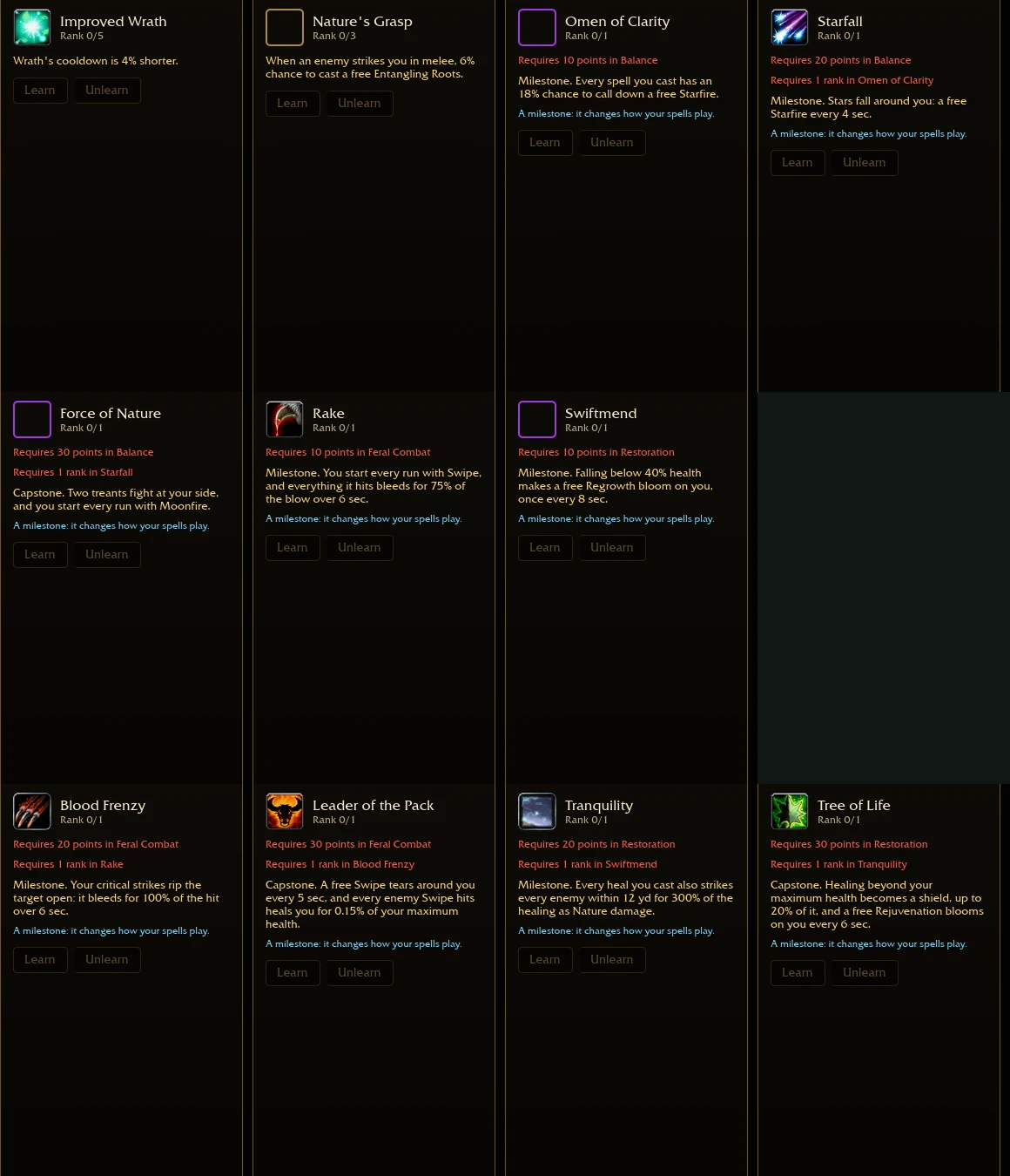
These tooltips were read directly in the original V0.90.0 menu on 15 October 2026. A “next-rank preview” was inspected at zero allocated ranks: it is not a tested maximum-rank value. Named milestone requirements are listed separately from points spent; no points were allocated during this check.
| Talent | Requirement / inspected rank | Displayed effect |
|---|---|---|
| Improved Wrath | Balance · 0 points · rank 0/5 | Next-rank preview: Wrath cooldown is 4% shorter |
| Nature's Grasp | Balance · 0 points · rank 0/3 | Next-rank preview: a melee hit against you has a 6% chance to trigger a free Entangling Roots |
| Omen of Clarity | Balance · 10 points · rank 0/1 | Each spell cast has an 18% chance to trigger a free Starfire |
| Starfall | Balance · 20 points + Omen of Clarity rank 1 | Triggers a free Starfire every 4 seconds |
| Force of Nature | Balance · 30 points + Starfall rank 1 | Adds two treant companions and starts each run with Moonfire |
| Rake | Feral Combat · 10 points · rank 0/1 | Starts each run with Swipe; its hits cause a bleed equal to 75% of the hit over 6 seconds |
| Blood Frenzy | Feral Combat · 20 points + Rake rank 1 | Critical hits cause a bleed equal to 100% of the hit over 6 seconds |
| Leader of the Pack | Feral Combat · 30 points + Blood Frenzy rank 1 | Triggers a free Swipe every 5 seconds; each enemy hit by Swipe heals 0.15% of maximum health |
| Swiftmend | Restoration · 10 points · rank 0/1 | Falling below 40% health triggers a free Regrowth, at most once every 8 seconds |
| Tranquility | Restoration · 20 points + Swiftmend rank 1 | Each heal also deals Nature damage equal to 300% of the heal to every enemy within 12 yards |
| Tree of Life | Restoration · 30 points + Tranquility rank 1 | Overhealing becomes a shield capped at 20% of maximum health; triggers a free Rejuvenation every 6 seconds |
On a narrow screen, scroll the table horizontally to read every column.
Read the prerequisites before committing points
The talent panel states that a row opens after five points spent in its tree, with milestones at 10, 20 and 30. It displays a maximum of 51 points. These are progression thresholds, not instructions to spend equal points in every branch.
Hover a node to read it, click to allocate and right-click to refund according to the inspected instructions. The panel states that respecs are free. A fresh Druid had no points to spend and an inactive Reset button, so the earlier menu inspection did not test removing an invested dependency chain.
Choose the branch around the spells and goal you intend to develop, then read the actual node and prerequisite. The system guide explains the common controls. This page does not import standard WoW Druid effects into similarly named talents.
Map the first zone's bosses to equipment slots
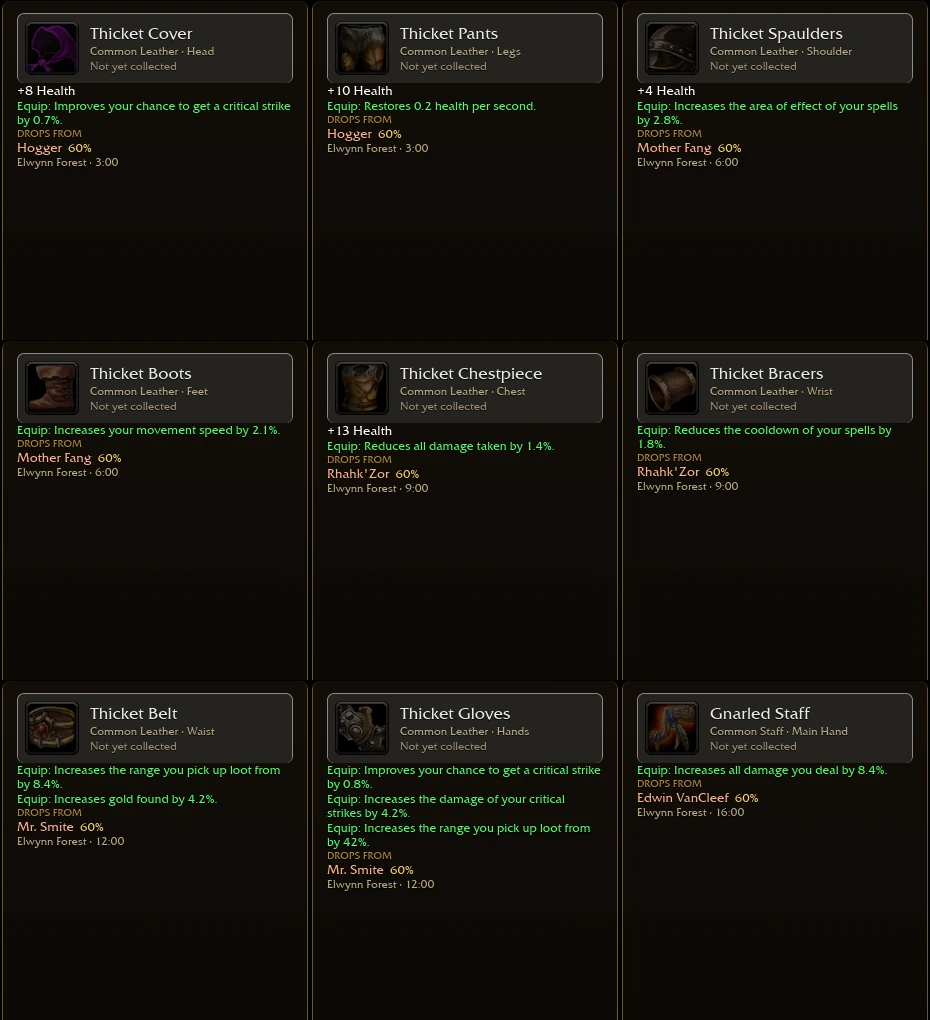
The inspected Druid Elwynn list has nine pieces: head and legs from Hogger, shoulders and feet from Mother Fang, chest and wrist from Rhahk'Zor, waist and hands from Mr. Smite, and a main-hand staff from Edwin VanCleef. The compact table below helps you find the checkpoint for an empty slot.
| Boss | Listed time | Druid slots |
|---|---|---|
| Hogger | 3:00 | Head, Legs |
| Mother Fang | 6:00 | Shoulder, Feet |
| Rhahk'Zor | 9:00 | Chest, Wrist |
| Mr. Smite | 12:00 | Waist, Hands |
| Edwin VanCleef | 16:00 | Main Hand |
On a narrow screen, scroll the table horizontally to read every column.
From a listed source to a persistent loadout
The full Elwynn loot table gives the item names and displayed 60% chance for each entry. The panel says each piece has its own roll and duplicates add nothing. A high displayed chance is therefore not a promise that your next clear produces a new collection piece.
After obtaining a piece, return to Collection and inspect the corresponding Druid slot. A loot list identifies where an item comes from; it does not prove you own or have equipped it. Use the equipment layer comparison to keep permanent class pieces separate from run jewellery.
Defeating VanCleef in Elwynn opens Duskwood in the inspected menu. That does not establish that Duskwood has the same drop names or probabilities. Choose the class and zone in Drop Tables whenever you move beyond this reference.
Inspect the original menu references
Open the inspected talent tooltip sheet or the nine individual Elwynn item panels at full size. These captures preserve the original menu text; values and prerequisites above were read from those panels, not inferred from World of Warcraft.
A Druid check before the next attempt
- Confirm that Druid is selected and read the equipped permanent pieces in Collection.
- Open Talents, read the effects supporting your intended spells and check whether their prerequisites are met.
- If you are farming an empty slot, use the verified checkpoint above and the full item table to identify its source.
- During the run, use the cards actually offered; do not assume a milestone name guarantees the complete spell combination.
- Before changing devices or importing progress, export a backup.
For a recorded damage-and-sustain interaction rather than a menu reference, compare the Paladin and Hunter examples. Their different progression makes them unsuitable for ranking Druid's strength.
Visual reference
Sources & scope
Sources checked 15 October 2026. Original V0.90.0 Druid menus · Starting spell, talent instructions and Elwynn equipment directly inspected · No complete build or combat performance claim. Menu inspection and recorded runs are identified below.
- Original game — V0.90.0 Druid class, Talents and Drop TablesDirect inspection on 15 October 2026; Wrath, three talent branches, milestone labels, point controls and nine Druid Elwynn loot entries. Menu observations do not establish a completed build's combat performance. Follow-up inspection verified the current V0.90.0 talent tooltips, prerequisite chains and nine Elwynn item panels for this class.
- Ghost Gaming Insider — original-game progression overview11 October 2026; supports the distinction between temporary run choices and persistent equipment and talent progression.